
Baby Tracker - Newborn Diary
Vu Ha ThiParenting
0.00.00 Reviews
- Version
- 1.0.2
- Installs
- 10.00K
- Age Rating
- Everyone
Screenshots

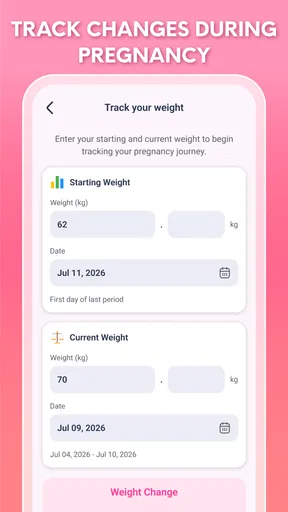
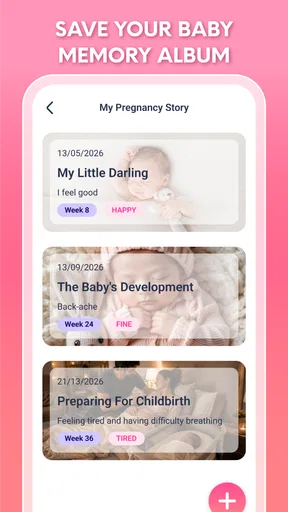
Our Review of Baby Tracker - Newborn Diary
 Analysis by Appyee
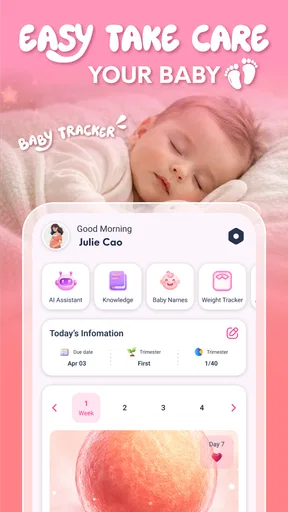
Pregnancy apps often try to do everything at once, but Baby Tracker - Newborn Diary takes a more personal route. I see it as a simple parenting app for following a pregnancy journey, recording memories, and keeping meaningful moments together in one place. After spending time with it, my impression is that its value comes less from complicated tools and more from building a small, repeatable habit around your baby’s story.
That makes it appealing if you want something gentle and easy to return to, rather than a crowded dashboard full of medical terminology. It is free, aimed at everyone, and developed by Vu Ha Thi. The app has passed the ten-thousand-install mark, which gives it a modest but real presence among family and pregnancy tools. It runs on Android seven and later, and version 1.0.2 is the version I would look for when installing it.
How I would use Baby Tracker - Newborn Diary day by day
I’d keep the routine deliberately small: after a meaningful appointment or at the end of a day worth remembering, I’d add one clear note rather than trying to document everything. That gives the diary a steady thread without turning it into another daily obligation, and it makes each entry easier to understand when I revisit it later.
A calm starting point for recording the journey
My preferred way to use this app is not to open it constantly. Instead, I would choose one dependable moment, such as after an evening meal or before going to bed, and use that time to add anything worth remembering. A short note about the day, a memorable feeling, or a photo can become much more valuable later than it seemed when it was written.
This is an important distinction. A diary-style pregnancy app is not automatically a replacement for medical care, a doctor’s instructions, or a dedicated appointment planner. I would use it as a personal record, not as a source for making health decisions. When something is medically important, I would keep following professional advice and use the app only to preserve the surrounding memory or context.
The store summary focuses on tracking the pregnancy journey, saving memories, and following special moments. In practice, that suggests a workflow built around continuity. Rather than treating each entry as an isolated update, I would try to make the diary tell a story over time. A quick sentence about how the day felt, paired with a meaningful image when appropriate, can make the timeline much easier to revisit.
A realistic everyday scenario
Imagine a busy weekday. You have attended an appointment, received a scan image, or simply noticed a moment that you want to remember. The practical approach is to avoid waiting for a quiet weekend when your memory may already be incomplete. Open the diary while the detail is still fresh, add a brief description, and save the entry before returning to the rest of the day.
That habit also helps when more than one person is involved. One parent may remember the practical details while the other remembers the emotional side of the day. Keeping short entries rather than trying to write a polished journal makes it easier for both people to contribute. I would not aim for perfect writing. The most useful record is the one that actually gets maintained.
The strongest idea here is consistency, not volume. A few honest entries made regularly are more useful than a long first session followed by weeks of silence. This is where a lightweight diary can beat a more elaborate alternative: it creates less resistance when you only have a minute.
What makes the memory side worthwhile
Many pregnancy tools concentrate on schedules, weekly information, reminders, or health-related guidance. Those functions can be useful, but they do not always preserve the personal side of the experience. Baby Tracker - Newborn Diary is better suited to the moments that are difficult to summarize in a calendar: the first time a family member feels movement, an unexpected emotional day, or a small preparation milestone that becomes meaningful later.
I would use descriptive wording instead of vague labels. “A good day” may not tell you much when you read it later, while a sentence explaining what happened can bring the moment back. Adding the date naturally through the app’s normal entry process, then keeping the note focused on one event, should make later browsing less confusing.
There is also a useful trade-off. A personal diary gives you freedom, but freedom means you need to decide what belongs in it. If you want automatic medical tracking, detailed charts, appointment management, or structured symptom analysis, a specialist pregnancy platform may be a better fit. This app’s appeal is precisely that it does not need to turn every moment into a measurement.
Settings and habits I would check first
Before committing to regular use, I would spend a few minutes exploring the available screens and deciding how I want to organize entries. The most important “setting” is often a personal rule: will this be a private memory journal, a shared family record, or a place for quick pregnancy notes? Choosing one main purpose prevents the diary from becoming a confusing mixture of unfinished lists and emotional reflections.
I would also check how the app handles the basic actions I expect to repeat: creating an entry, attaching or viewing a memory, returning to older entries, and correcting something I wrote earlier. These are not glamorous features, but they determine whether the app remains comfortable after the novelty fades. If any screen feels unclear, I would test it with a harmless sample entry before adding important memories.
Because the application is free and rated for everyone, it may be attractive to families looking for an uncomplicated starting point. Still, I would be deliberate about the kind of information I place in any personal app. I would avoid treating diary notes as a secure medical file, and I would think carefully before recording sensitive details that do not need to be there. A memory journal should be useful without becoming an unnecessarily complete profile of your family.
The current version is 1.0.2, so I would keep expectations realistic about polish. Early versions can feel more focused than mature all-in-one products, but they may also have rough edges in navigation or organization. My advice is to judge it by the tasks you actually need: if recording and revisiting memories feels straightforward, its simplicity works in its favor. If you need a deep configuration system, you may notice the limits quickly.
Faster patterns for people who do not enjoy journaling
Not everyone likes writing diary entries, and that should not prevent you from using a memory-focused app. I would create a tiny template in my head for each visit: what happened, how I felt, and what I want to remember. Even a few words for each point can produce a useful record without turning the process into homework.
Another efficient pattern is to record one event at a time instead of trying to summarize an entire week. A single entry after an appointment, family visit, or preparation milestone is easier to find later than a long paragraph containing several unrelated memories. This also reduces the chance that important details disappear inside a large block of text.
If you are using the app with a partner, agree on a simple division of responsibility. One person might add entries after appointments, while the other records family reactions or everyday moments. That approach avoids duplicate notes and makes the diary feel collaborative without requiring both people to update it every day.
I would also avoid turning every ordinary day into an obligation. The best rhythm may be to record moments that feel distinct rather than forcing a daily entry. A diary that reflects real life, including quiet gaps, can feel more authentic than a perfectly filled calendar. The app should support the experience, not create another task that causes stress.
Where it compares well with usual alternatives
Compared with a notes app, Baby Tracker - Newborn Diary offers a more focused destination for pregnancy memories. A general notes tool may be faster for a single thought, but it can scatter information among shopping lists, work notes, and unrelated reminders. A dedicated diary gives the subject a clearer home, which matters when you want to revisit the journey later.
Compared with a feature-heavy pregnancy tracker, this app may feel less overwhelming. Large pregnancy platforms often combine educational content, calendars, health logs, checklists, community features, and notifications. That breadth can be valuable for someone who wants guidance and planning in one place. For me, though, the diary approach is preferable when the main goal is preserving personal moments rather than monitoring every category of pregnancy information.
It also differs from a photo gallery. A gallery is excellent for storing images, but it rarely explains why a particular picture mattered or what was happening around it. A short written memory can provide the missing context. The trade-off is that a gallery may offer more mature sorting and sharing tools, while this app is more directly centered on the pregnancy narrative.
For a family that already uses a comprehensive health tracker, I would not install this expecting it to replace that system. I would use the two for different purposes if the extra diary is worth maintaining: one for structured information and one for personal memories. If managing two apps feels like unnecessary duplication, stick with the tool you are most likely to open consistently.
Advanced use without pretending the app does more than it does
Experienced users often get better results from simple apps by creating repeatable routines rather than searching for hidden functions. With this diary, that means deciding on an entry style, using the same kind of wording for recurring moments, and reviewing older memories occasionally. These habits improve the usefulness of the record without requiring features that may not exist.
For example, I would keep appointment-related memories separate in wording from casual family moments. Starting a note with a clear phrase such as “appointment,” “family,” or “preparation” can make manual browsing easier. This is not a claim that the app automatically categorizes entries; it is simply a practical way to add structure yourself when a diary is flexible.
I would also make a periodic review part of the experience. Once in a while, read through recent entries and correct unclear wording while the context is still familiar. This can turn scattered notes into a more coherent story. It is especially useful when several entries concern the same stage of pregnancy and would otherwise blur together.
One limitation of this approach is that it depends on your discipline. If you want automatic reminders, detailed analytics, or a guided weekly program, a purpose-built tracker may save more effort. A manual system can be rewarding, but it is not effortless. The app works best for someone who values control and personal expression more than automation.
Questions I would consider before installing
If you are wondering whether it is suitable for a first pregnancy, I would say yes, provided you view it as a memory and tracking companion rather than a medical authority. Its straightforward purpose can be less intimidating than a large app with many sections. Beginners can start with occasional notes and add more detail only when they discover what they want to remember.
If you are already expecting a baby, it can still be useful to begin now. You do not need to recreate every earlier moment. Start with the next meaningful event and, if you remember something important from before, add it as a separate retrospective note. Trying to reconstruct an entire pregnancy in one sitting is likely to feel tiring and may lead to abandoning the project.
For someone looking for newborn care tracking after birth, I would examine the app’s actual workflow before relying on it for that purpose. Its identity is centered on the pregnancy journey and memories, so parents who need precise feeding, sleep, diaper, medication, or growth records should choose a tool designed specifically for those tasks. A diary can complement those records, but it should not be assumed to replace them.
Families also ask whether a free app is enough for long-term use. In my view, the answer depends on what you want from the archive. If your priority is a simple personal record, free access removes a major barrier to starting. If you need extensive export, collaboration, advanced sorting, or a carefully managed medical history, compare those needs with the app’s actual controls before making it your only record.
Finally, I would ask whether I am willing to maintain another place for memories. The app is most worthwhile when it becomes the obvious destination for pregnancy notes. If you already keep a detailed private journal and a well-organized photo archive, adding this tool may not improve your routine. Its benefit is greatest for people who want a dedicated, low-pressure space and currently have no consistent system.
My verdict after looking at the complete experience
Baby Tracker - Newborn Diary has a clear personality: it is a modest parenting app built around following a pregnancy and keeping the moments that make the journey personal. I like that its purpose does not require a complicated learning curve. The free price and Everyone rating make it approachable, while support for Android seven and later keeps the technical entry point fairly broad.
Its biggest strength is the way it encourages intentional remembering. It can turn a scan image, a family reaction, or a small milestone into something with context instead of leaving it buried in a camera roll. The practical secret is to use it in short sessions, follow a consistent note pattern, and avoid expecting it to serve as a complete health-management platform.
Its main weakness is the same simplicity that makes it inviting. Parents who want extensive automation, professional health tracking, detailed newborn logs, or a large ecosystem of planning tools may outgrow it. I would also be cautious about placing sensitive medical information into a diary unless the app’s handling of that information fits your own comfort level.
For a friend who wanted a focused place to preserve pregnancy memories, I would recommend giving it a try, especially if elaborate trackers feel distracting. I would suggest starting with one meaningful entry, testing how naturally you can return to it, and then building a small routine around the moments you genuinely want to keep. That is where this app makes the most sense: not as an all-purpose pregnancy command center, but as a personal record that becomes more valuable each time you add something real.
Verdict
Strengths of Baby Tracker - Newborn Diary
- Quick logging for feeds, diapers, sleep, pumping, and other baby activities.
- Clear daily summaries help parents spot routines and changes over time.
- Supports multiple caregivers, making shared tracking more convenient.
- Useful reminders can help prevent missed feeding or medication schedules.
- Data export options make it easier to share records with a pediatrician.
Limitations of Baby Tracker - Newborn Diary
- The number of tracking categories may feel overwhelming for new users.
- Some useful features may require a premium subscription.
- Manual logging can become time-consuming during especially busy days.
- Cloud syncing and sharing depend on a reliable internet connection.
- Detailed tracking may increase anxiety for parents who prefer a simpler approach.
Similar Picks in This Category
View All
Family Space
Motorola Mobility LLC.3.9

شرطة الأطفال - مكالمة وهمية
Oub Apps4.1

Findmykids: Parental Control
LETEM LTD4.6

Pregnancy + | Tracker App
Philips Electronics UK Limited4.8

Policía de niños - para padres
Kids police4.7

Pregnancy App
Amila4.9
Frequently Asked Questions
What is Baby Tracker - Newborn Diary used for?
Baby Tracker - Newborn Diary is designed to help parents record and monitor everyday newborn care. You can log feeding sessions, bottle amounts, diaper changes, sleep periods, pumping, medication, growth measurements, and other important routines. Keeping these details in one place can make patterns easier to recognize and gives you useful information to discuss with a pediatrician.
Is Baby Tracker - Newborn Diary suitable for breastfeeding and bottle-feeding?
Yes. The app supports several feeding-tracking options, making it useful for breastfeeding, bottle-feeding, pumping, or a combination of methods. Depending on the activity you record, you can generally note times, durations, quantities, and sides used. This can be especially helpful during the early weeks, when feeding schedules change frequently and details are easy to forget.
Can more than one parent or caregiver use the same baby profile?
Baby Tracker - Newborn Diary may support sharing or synchronization between caregivers, depending on the version, device, and account setup. This allows parents or other trusted family members to keep records updated from separate phones. Before relying on shared data, check the app’s current synchronization settings and confirm that everyone is viewing the same profile and information.
Does the app provide medical advice or replace a pediatrician?
No. Baby Tracker - Newborn Diary is a tracking and organization tool, not a diagnostic or medical-care service. Its charts, reminders, and summaries can help you observe routines, but they should not be used to diagnose an illness or decide on treatment. Contact a qualified healthcare professional whenever your baby shows concerning symptoms or feeding, sleeping, or diaper patterns change significantly.
Is Baby Tracker - Newborn Diary free to download, and are there extra features?
The app’s availability, pricing, and included features can vary between Android and iOS and may change with updates. Some basic tracking functions may be available without payment, while advanced tools, additional reports, synchronization options, customization, or an ad-free experience could require in-app purchases or a subscription. Review the store listing carefully before downloading or starting a trial.
